
DocWriter Studio Multi-Agent is helping with enterprise technical documentation. Migration guides, integration playbooks, and architecture documents often balloon to 60+ pages, require multiple review cycles, and demand a consistent tone across dozens of sections. Manual authoring means weeks of work, fragmented knowledge, and documents that quickly fall out of date.
This article walks through the high-level design (HLD) and business flow of DocWriter Studio, an agentic AI system that orchestrates multiple specialised AI agents to generate executive-ready technical documents with embedded diagrams—all running on Azure Container Apps and Azure Service Bus.
All articles from the series can be found here.
Live Demo
🚀 Try the Free Demo: DocWriter Studio Multi-Agent AI – Create professional technical documents in minutes, not weeks.
Challenges with long documents created by the AI
Modern enterprises face three critical documentation challenges:
1. Scale and coherence – Documents exceed 60 pages with dozens of interdependent sections. Manual writing leads to contradictions, inconsistent terminology, and gaps in logical flow.
2. Stakeholder alignment – Different audiences (executives, architects, developers) require tailored content, but most teams lack the bandwidth to customise and maintain multiple versions.
3. Diagram integration – Architecture diagrams are authored separately in Visio or draw.io, quickly become outdated, and rarely match the document narrative.
Business requirement: To address these challenges, we needed a cloud-native, automated system that produces publication-ready Markdown, PDF, and DOCX artifacts with auto-generated PlantUML diagrams, while maintaining human oversight through review cycles.
DocWriter Multi-Agent AI Architecture: How It Works
The DocWriter architecture follows three core principles that enable scalability and reliability:
- Agentic decomposition – Each stage (planning, writing, reviewing, verifying, rewriting) is handled by a specialised AI agent optimised for that task
- Queue-driven decoupling – Azure Service Bus queues enable horizontal scaling, retry logic, and independent worker lifecycle management
- Blob-backed state – All artifacts (drafts, plans, diagrams, final documents) persist in Azure Blob Storage with structured paths for auditability.
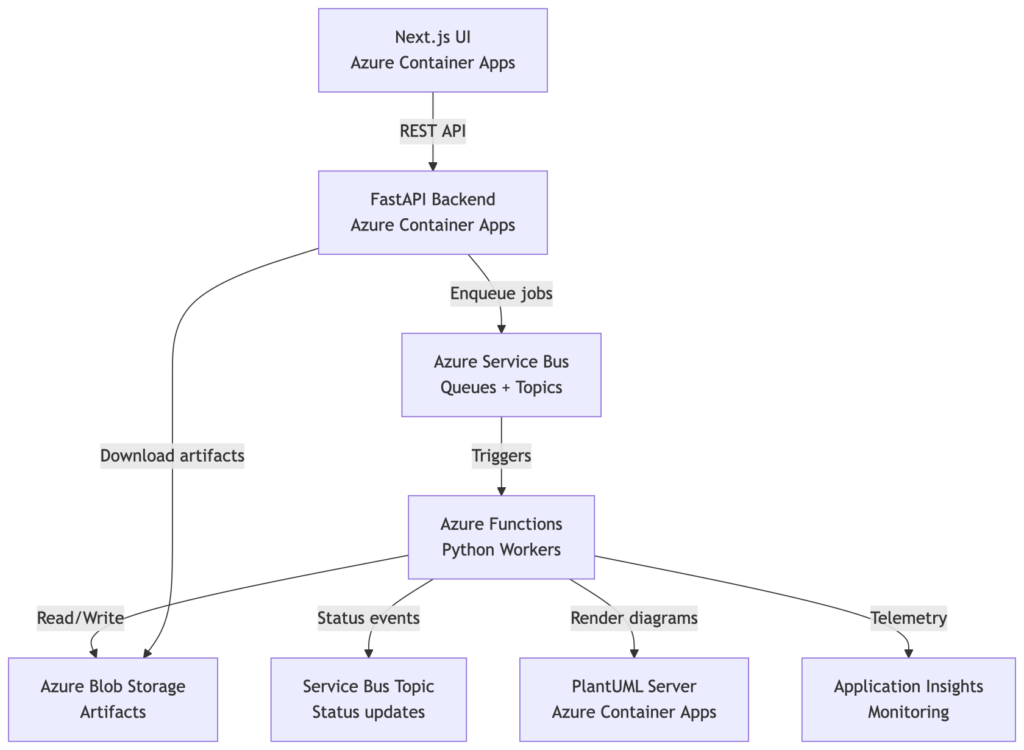
Azure Cloud Services Powering DocWriter Studio Multi-Agent
To bring this architecture to life, DocWriter Studio leverages the following Azure cloud services:
- Azure Container Apps – Hosts FastAPI, Next.js UI, and PlantUML server with autoscaling
- Azure Functions (Python) – Runs 9 specialized workers (plan-intake, plan, write, review, verify, rewrite, diagram-prep, diagram-render, finalize)
- Azure Service Bus – 10+ queues for stage orchestration + 1 status topic for observability
- Azure Blob Storage – Hierarchical artifact storage (`jobs/{user_id}/{job_id}/…`)
- Application Insights – Distributed tracing, token usage metrics, and stage durations.
DocWriter Studio Multi-Agent Document Generation Workflow: 10-Stage Pipeline
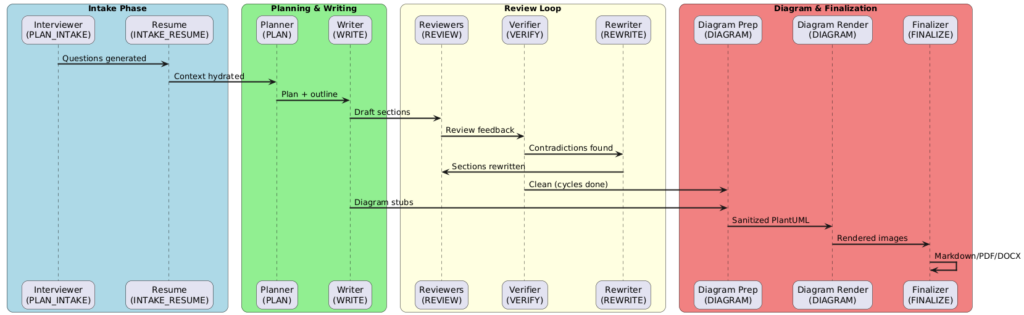
At the heart of the system, DocWriter implements a dependency-aware, iterative pipeline with specialized AI agents at each stage:
Stage 1: Intelligent Intake Questions (PLAN_INTAKE)
Agent: Interviewer (GPT-5.2)
Purpose: Generates 5-10 clarifying questions based on the document title and the audience
Output: `jobs/{job_id}/intake/questions.json`
Stage 2: Context Hydration (INTAKE_RESUME)
Agent: Context hydrator
Purpose: Merges user answers with job metadata, allocates working document blob
Output: `jobs/{job_id}/intake/context.json`
Stage 3: Document Planning (PLAN)
Agent: Planner (GPT5.2)
Purpose: Builds structured outline, glossary, style guardrails, PlantUML diagram specs
Output: `jobs/{job_id}/plan.json` (sections, dependencies, constraints)
Stage 4: Content Generation (WRITE)
Agent: Writer (GPT5.2)
Purpose: Generates sections in topological order (prerequisites first), batched for efficiency
Key features:
Shared memory (style guide, glossary, facts) for consistency
Dependency summaries passed to downstream sections
Embeds PlantUML/Mermaid diagram stubs
Output: `jobs/{job_id}/draft.md`
Stages 5-8: Multi-Agent Review Loop (REVIEW → VERIFY → REWRITE)
Following the initial draft, the system employs 4 specialized reviewers (GPT5.2) to refine the content:
Agents: 4 specialized reviewers (GPT5.2)
General reviewer: Flags contradictions and quality issues
Style reviewer: Ensures clarity, tone, readability (disabled for now)
Cohesion reviewer: Validates flow, transitions, crossreferences (disabled for now)
Executive summary reviewer: Polishes summary content (disabled for now)
Verifier (VERIFY): Crosschecks revisions against dependency summaries, flags contradictions
Rewriter (REWRITE): Applies targeted rewrites using combined reviewer + verifier guidance
Loop control: Cycles up to N times (userconfigurable, default 2)
Stage 9: Diagram Generation (DIAGRAM_PREP + DIAGRAM_RENDER)
Diagram Prep: Extracts PlantUML blocks, sanitizes syntax with GPT5.2codex reformatter
Diagram Render: Calls PlantUML server (Azure Container Apps), stores PNG/SVG in `jobs/{job_id}/images/`
Status events: QUEUED → START → DONE/FAILED (per diagram)
Stage 10: Document Finalization (FINALIZE)
Agent: Finalizer
Purpose:
Document Assembly: Replaces diagram stubs with image links, injects auto-generated title page, and numbers headings with preserved internal hyperlinks
Multi-Format Export:
DOCX: python-docx conversion for editing
Markdown: Original format with all metadata
PDF: WeasyPrint rendering with embedded images
Output: `jobs/{job_id}/final.{md,pdf,docx}`
DocWriter Studio Multi-Agent Business Flow: From Request to Publication-Ready Document
Step 1: Interactive Intake
Minimal User Input Required:
- Document title (e.g., “Azure Synapse to Fabric Migration Playbook”)
- Target audience (e.g., “Enterprise Integration Architects”)
- Review cycles (1-5, default 2)
AI-Generated Questions: Subsequently, the system generates tailored questions with intelligent defaults based on document type and industry context.
Step 2: Job Orchestation
Step 3: Transparent Progress
Every stage publishes to `docwriter-status` topic:
{
  "job_id": "abc123",
  "user_id": "auth0|xyz",
  "stage": "WRITE_DONE",
  "timestamp": "2026-02-09T14:32:00Z",
  "duration_seconds": 87,
  "tokens_used": 12450,
  "model": "gpt-5.2",
  "artifact_path": "jobs/auth0|xyz/abc123/draft.md"
}User Interface (/workspace): Real-time dashboard displays stage progress bars with completion percentage, token usage per AI agent, duration metrics for performance monitoring, and expandable review cycle details.
Step 4: Secure Artifact Download
Authenticated API Access: Users download final deliverables via GET /jobs/artifacts?path=... with user identity validation, audit trail for compliance, and support for all three formats (MD, PDF, DOCX).
Infrastructure as Code: Terraform for Azure Container Apps
The full code for DocWriter Studio Multi-Agent – Terraform can be found in my GitHub repo: azure-way/aidocwriter
Container Apps Environment & Applications module invocation:
module "app" {
  source                   = "./modules/app"
  name_prefix              = local.name_prefix
  location                 = azurerm_resource_group.main.location
  resource_group_name      = azurerm_resource_group.main.name
  log_analytics_id         = module.monitoring.log_analytics_id
  managed_identity_id      = azurerm_user_assigned_identity.ca_identity.id
  container_registry_login = module.container_registry.url
  plantuml_server_name     = var.plantuml_server_name

  tags = var.tags
  api_images = {
    api = {
      image        = "${module.container_registry.url}/docwriter-api:${var.docker_image_version}"
      min_replicas = 1
      max_replicas = 1
    }
    plantuml = {
      image        = "${module.container_registry.url}/plantuml-server:${var.docker_image_version}"
      min_replicas = 1
      max_replicas = 1
    }
  }

  api_ports = {
    api      = 8000
    plantuml = 8080
  }
   ...
}resource "azurerm_container_app_environment" "main" {
name = "${var.name_prefix}-cae"
location = var.location
resource_group_name = var.resource_group_name
log_analytics_workspace_id = var.log_analytics_id
tags = var.tags
workload_profile {
name = "Consumption"
workload_profile_type = "Consumption"
maximum_count = 0
minimum_count = 0
}
}
resource "azurerm_container_app" "api" {
for_each = var.api_images
name = "${var.name_prefix}-${each.key}"
resource_group_name = var.resource_group_name
container_app_environment_id = azurerm_container_app_environment.main.id
revision_mode = "Single"
tags = var.tags
identity {
type = "SystemAssigned, UserAssigned"
identity_ids = [var.managed_identity_id]
}
registry {
server = var.container_registry_login
identity = var.managed_identity_id
}
...
}Key deployment features:
- Consumption plan for cost-effective autoscaling
- Managed identity for ACR pulls and Key Vault secret access
- CORS configuration for localhost + production origins
- Environment variables injected from Key Vault (OpenAI keys, Service Bus connection strings)
Why Azure Container Apps for Multi-Agent AI Systems?
- Microservices-Ready Architecture
Each component (API, UI, PlantUML server, and 9 Azure Functions) runs independently with isolated scaling policies.
2. Native Azure Service Bus Integration
Functions trigger directly from Service Bus queues with automatic retry, dead-lettering, and distributed tracing via Application Insights.
3. Cost Optimization
- Consumption plan scales to zero
- Pay only for active function executions
- Blob Storage for cold artifacts (cheaper than databases)
4. Enterprise Compliance
- Private networking via VNet integration (optional)
- Managed identities eliminate credential usage
- Application Insights provides audit trails for document lineage
5. Developer Experience
- Local development with `func start` + `uvicorn` mirrors production
- GitHub Actions CI/CD with Terraform drift detection
- Terraform modules for repeatable infrastructure
DocWriter metrics from tests
| Metric | Value |
|---|---|
| Avg document length | 90 pages (PDF) |
| Avg generation time | 45-60 minutes (2 review cycles) |
| Total tokens per document | 250K-350K (across all agents) |
| Diagram count | 8-15 PlantUML diagrams per document |
| Cost per document | $3-7 (Azure OpenAI API + Azure compute) |
| Container Apps scale-to-zero | <2 seconds cold start |
DocWriter Studio Multi-Agent – lessons learned
1. Dependency-Aware Writing is Critical
Sections written in topological order (prerequisites first) dramatically reduce contradictions. Writer agent receives summaries of all dependencies before generating content.
2. Batching Reduces Token Costs
Originally, each section triggered a separate review call. Batching 3 sections per review reduced token usage by 40% while maintaining quality.
3. PlantUML Requires Sanitization
Raw LLM-generated PlantUML often has syntax errors (missing `@enduml`, stray markdown fences). A dedicated GPT-5.2-codex reformatter call before rendering dropped failure rates from 30% to <5%.
4. Status Topic Enables Observability
Publishing stage transitions to a Service Bus topic (not just logs) allows building real-time dashboards, alerting on stalled jobs, and user-facing progress UIs.
5. Auth0 + Blob Isolation is Non-Negotiable
Multi-user SaaS requires scoping blob paths to `jobs/{user_id}/{job_id}/…` and validating ownership at the API layer. Without this, any authenticated user could access others’ artifacts.
What’s Your Take?
Have you built agentic AI systems on Azure? What challenges did you face with multi-stage workflows, cost optimization, or observability? Let’s discuss on [LinkedIn](https://linkedin.com) – I’d love to hear your experiences!
Found this useful? Give the repo a ⭐ and stay tuned for the next article on Azure Service Bus patterns for AI agents.