
Building AI Agent Workflows with Azure Service Bus using queues and topics for horizontal scaling — A deep dive into the DocWriter Studio architecture.
Key Takeaways
✅ Queue-based decoupling enables independent scaling of AI agent stages
✅ Azure Service Bus topics provide zero-code observability through pub/sub patterns
✅ 5-minute lock durations accommodate slow LLM calls without message loss
✅ Dead letter queues isolate poison messages for debugging
✅ Azure Container Apps enable scale-to-zero for cost optimization
✅ Matrix CI/CD builds maintain 11 function images with minimal overhead
Series context: This is Part 2 of the DocWriter Studio series. In Part 1 — DocWriter Studio Multi-Agent: AI-Powered Document Generation on Azure we introduced the challenge of generating enterprise-grade, 60+ page technical documents with AI and presented the high-level system overview. In this article we zoom into the messaging backbone that makes the multi-agent pipeline reliable, observable, and horizontally scalable.
Table of Contents
- Why AI Agent Decoupling Matters
- Azure Service Bus Architecture Overview
- Understanding Queues vs Topics
- The ServiceBusManager: Centralized Messaging Layer
- Deploying AI Agents with Azure Functions
- Scaling AI Agents with Container Apps
- Azure Container Apps CI/CD Pipeline
- Real-Time AI Pipeline Monitoring
- End-to-End Workflow Example
- Production Scaling Strategies
- Lessons Learned
Why AI Agent Decoupling Matters: Queues vs Monolithic Architecture
A traditional monolithic approach to AI orchestration—where a single process calls the Planner, then the Writer, then each Reviewer sequentially—works for prototypes but collapses under production demands:
| Challenge | Monolithic Impact | Queue-Decoupled Solution |
|---|---|---|
| Long-running LLM calls | One slow GPT-5.2 write call blocks everything | Each stage runs independently; slow calls don’t starve others |
| Failures and retries | One crash loses the entire job | Service Bus retries and dead-letter queues isolate failures |
| Scaling | Must scale the whole process together | Scale hot stages (e.g., Write) independently from cold stages (e.g., Finalize) |
| Observability | Buried in application logs | Every stage transition is a topic event visible to any subscriber |
DocWriter Studio solves these challenges by treating each AI agent as a self-contained worker connected through Azure Service Bus queues for point-to-point work dispatch and a topic for fan-out status broadcasting.
Azure Service Bus is a fully managed message broker service that enables reliable communication between distributed applications. For AI agent workflows, it provides queue-based work orchestration and topic-based event broadcasting, allowing independent scaling of pipeline stages while maintaining end-to-end observability.
Azure Service Bus Architecture: Queues, Topics & Container Apps Overview
The system deploys on Azure Container Apps with each pipeline stage running as an independent containerized Azure Function. Here is the complete message flow:
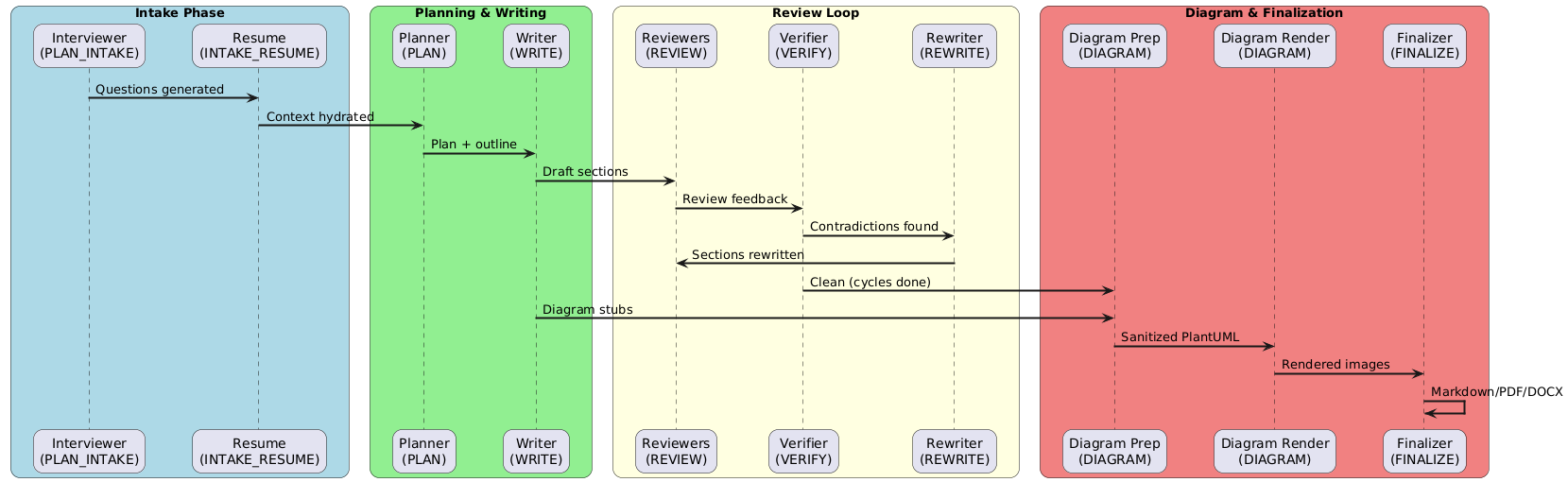
Understanding Azure Service Bus: Queues vs Topics for AI Workflows
1. Queues — Point-to-Point Work Dispatch
Each pipeline stage has a dedicated Service Bus queue. Azure Service Bus queues provide first-in-first-out message storage for point-to-point communication between services. The full list of 13 queues wired through DocWriter:
| Queue Name | Purpose |
|---|---|
| docwriter-plan-intake | Triggers the Interviewer agent to generate intake questions |
| docwriter-intake-resume | Resumes the pipeline after user answers are submitted |
| docwriter-plan | Triggers the Planner agent (gpt-5.2) to build the document outline |
| docwriter-write | Triggers the Writer agent (gpt-5.2) to generate sections in batches |
| docwriter-review | General quality reviewer |
| docwriter-review-style | Style/tone/readability reviewer |
| docwriter-review-cohesion | Flow and cross-reference reviewer |
| docwriter-review-summary | Executive summary reviewer |
| docwriter-verify | Contradiction verifier against dependency summaries |
| docwriter-rewrite | Targeted section rewriter |
| docwriter-diagram-prep | Extracts and sanitizes PlantUML/Mermaid blocks |
| docwriter-diagram-render | Calls PlantUML server to render PNG/SVG |
| docwriter-finalize-ready | Assembles final document with title page, diagrams, and exports |
All queues are provisioned through a single Terraform module using a for_each loop:
# infra/terraform/modules/service_bus/main.tf
# Source: https://github.com/azure-way/aidocwriter/blob/main/infra/terraform/modules/service_bus/main.tf

resource "azurerm_servicebus_queue" "queues" {
  for_each = toset(var.queues)

  name         = each.value
  namespace_id = azurerm_servicebus_namespace.main.id

  max_delivery_count  = 10
  lock_duration       = "PT5M"
  default_message_ttl = "P14D"

  dead_lettering_on_message_expiration = true
}
Key configuration choices for AI agent workflows:
- lock_duration = “PT5M” — LLM calls are slow. A 5-minute lock gives the Writer or Reviewer agent enough time to complete before the message becomes available to other consumers. Workers can also explicitly renew the lock for longer operations.
- max_delivery_count = 10 — Transient Azure OpenAI throttling is expected. Ten retries provide resilience without excessive noise.
- dead_lettering_on_message_expiration = true — Poison messages (e.g., corrupted job payloads) land in the dead-letter queue rather than looping forever, making debugging straightforward.
2. Topics — Fan-Out Status Broadcasting
While queues handle 1:1 work dispatch, the status topic (docwriter-status) implements a publish-subscribe pattern for observability:
# infra/terraform/modules/service_bus/main.tf
# Source: https://github.com/azure-way/aidocwriter/blob/main/infra/terraform/modules/service_bus/main.tf

resource "azurerm_servicebus_topic" "status" {
  name                 = "${var.name_prefix}-status"
  namespace_id         = azurerm_servicebus_namespace.main.id
  partitioning_enabled = true
}

resource "azurerm_servicebus_subscription" "console" {
  name               = "console"
  topic_id           = azurerm_servicebus_topic.status.id
  max_delivery_count = 10
}

resource "azurerm_servicebus_subscription" "status_writer" {
  name               = "status-writer"
  topic_id           = azurerm_servicebus_topic.status.id
  max_delivery_count = 10
}
Two subscriptions serve different consumers:
- status-writer — consumed by a dedicated Azure Function that persists every status event to Azure Table Storage, powering the API’s /jobs/{job_id}/timeline endpoint.
- console — available for CLI-based monitoring, dashboards, or any additional subscriber without modifying existing consumers.
This is the fundamental advantage of Azure Service Bus topics over queues: adding a new consumer (e.g., a Slack notifier, an analytics pipeline) requires zero code changes — just create a new subscription.
The ServiceBusManager: Centralized Messaging Layer
At the core of every worker sits the ServiceBusManager class, a singleton that encapsulates both queue dispatch and topic publishing:
# src/docwriter/messaging.py
# Source: https://github.com/azure-way/aidocwriter/blob/main/src/docwriter/messaging.py

class ServiceBusManager:
    """Manage Service Bus connections and normalized status publishing."""

    _client: ServiceBusClient | None = None
    _connection: str | None = None

    def __init__(self) -> None:
        self._status_defaults: Set[str] = {
            "aidocwriter-status",
            "docwriter-status",
        }

    def ensure_ready(self) -> None:
        settings = get_settings()
        if not settings.sb_connection_string:
            raise RuntimeError("SERVICE_BUS_CONNECTION_STRING not set")
        if self._client is None or self._connection != settings.sb_connection_string:
            self._client = ServiceBusClient.from_connection_string(settings.sb_connection_string)
            self._connection = settings.sb_connection_string

    # Queue interactions -------------------------------------------------
    def send_queue(self, queue_name: str, payload: Dict[str, Any]) -> None:
        self.ensure_ready()
        client = self.get_client()
        try:
            with client.get_queue_sender(queue_name) as sender:
                sender.send_messages(ServiceBusMessage(json.dumps(payload)))
        except Exception as exc:
            track_exception(exc, {"queue": queue_name})
            raise
Several design decisions stand out:
- Lazy initialization — The connection is established only when ensure_ready() is first called, and reconnects automatically if the connection string rotates.
- Centralized exception tracking — Every failed send is immediately logged to Application Insights via track_exception(), making queue-level issues visible in Azure Monitor without manual log parsing.
- Topic fallback chain — The _status_topics() method implements a graceful degradation strategy across multiple topic names, ensuring status events are published even during infrastructure migrations.
Status publishing constructs a structured StatusEvent with job ID, stage, timestamp, cycle number, token usage, and any stage-specific metadata:
# src/docwriter/messaging.py
# Source: https://github.com/azure-way/aidocwriter/blob/main/src/docwriter/messaging.py

def publish_status(self, payload: Union[StatusEvent, Dict[str, Any]]) -> None:
    if isinstance(payload, StatusEvent):
        payload = payload.to_payload()
    self.ensure_ready()
    _ensure_status_message(payload)
    topics = self._status_topics()
    client = self.get_client()
    sent = False
    last_exc: Exception | None = None
    for topic in topics:
        try:
            with client.get_topic_sender(topic) as sender:
                sender.send_messages(ServiceBusMessage(json.dumps(payload)))
            sent = True
            break
        except Exception as exc:
            last_exc = exc
            track_exception(exc, {"topic": topic})
    if not sent and last_exc:
        logging.error("Failed to publish status event to Service Bus: %s", last_exc)
    props = {k: str(v) for k, v in payload.items() if isinstance(v, (str, int, float))}
    if "job_id" in payload:
        track_event("job_status", props)
Deploying AI Agents with Azure Functions and Service Bus Triggers
Each AI agent is deployed as an independent Azure Function with a Service Bus trigger. The pattern is identical across all 11 function apps, making the architecture predictable and easy to extend:
# src/functions_write/function_app.py
# Source: https://github.com/azure-way/aidocwriter/blob/main/src/functions_write/function_app.py

from __future__ import annotations

import azure.functions as func

from docwriter.queue import process_write
from functions_shared.runtime import service_bus_handler

app = func.FunctionApp()


@app.function_name(name="write_trigger")
@app.service_bus_queue_trigger(
    arg_name="msg",
    queue_name="%SERVICE_BUS_QUEUE_WRITE%",
    connection="SERVICE_BUS_CONNECTION_STRING",
)
def write_trigger(msg: func.ServiceBusMessage) -> None:
    service_bus_handler("worker-write", msg, process_write)
The %SERVICE_BUS_QUEUE_WRITE% syntax uses Azure Functions’ binding expressions, resolving the queue name from environment variables at runtime rather than hardcoding it. This lets the same code run against different Service Bus namespaces (dev, staging, production) with zero changes.
The shared service_bus_handler bridges the Azure Functions runtime with the domain logic:
# src/functions_shared/runtime.py
# Source: https://github.com/azure-way/aidocwriter/blob/main/src/functions_shared/runtime.py

def service_bus_handler(
    worker_name: str,
    message: func.ServiceBusMessage,
    processor: Processor,
) -> None:
    """Execute a queue processor inside an Azure Function host."""
    worker_utils.configure_logging(worker_name)
    data = _decode_body(message)
    # Attach renewal callback when available so processors can extend the lock.
    try:
        renew_lock = getattr(message, "renew_lock", None)
        if callable(renew_lock):
            data["_renew_lock"] = renew_lock
    except Exception:
        pass
    try:
        processor(data)
    except Exception:
        logging.exception("Worker %s failed for job payload", worker_name)
        raise
This handler:
- Configures per-worker logging with the worker name prefix for clear log filtering in Azure Monitor.
- Passes the lock renewal callback into the processor so long-running LLM calls can extend their message lock beyond the initial 5 minutes.
- Re-raises exceptions to let the Azure Functions runtime handle retries according to the queue’s max_delivery_count.
The Review Agent: Fan-Out Within a Stage
The Review stage demonstrates the most sophisticated queue usage — a single function app hosts four independent triggers, each bound to its own queue:
# src/functions_review/function_app.py
# Source: https://github.com/azure-way/aidocwriter/blob/main/src/functions_review/function_app.py

@app.function_name(name="review_trigger")
@app.service_bus_queue_trigger(
    arg_name="msg",
    queue_name="%SERVICE_BUS_QUEUE_REVIEW%",
    connection="SERVICE_BUS_CONNECTION_STRING",
)
def review_trigger(msg: func.ServiceBusMessage) -> None:
    service_bus_handler("worker-review", msg, process_review)

@app.function_name(name="review_general_trigger")
@app.service_bus_queue_trigger(
    arg_name="msg",
    queue_name="%SERVICE_BUS_QUEUE_REVIEW_GENERAL%",
    connection="SERVICE_BUS_CONNECTION_STRING",
)
def review_general_trigger(msg: func.ServiceBusMessage) -> None:
    service_bus_handler("worker-review-general", msg, process_review_general)

@app.function_name(name="review_style_trigger")
@app.service_bus_queue_trigger(
    arg_name="msg",
    queue_name="%SERVICE_BUS_QUEUE_REVIEW_STYLE%",
    connection="SERVICE_BUS_CONNECTION_STRING",
)
def review_style_trigger(msg: func.ServiceBusMessage) -> None:
    service_bus_handler("worker-review-style", msg, process_review_style)

@app.function_name(name="review_cohesion_trigger")
@app.service_bus_queue_trigger(
    arg_name="msg",
    queue_name="%SERVICE_BUS_QUEUE_REVIEW_COHESION%",
    connection="SERVICE_BUS_CONNECTION_STRING",
)
def review_cohesion_trigger(msg: func.ServiceBusMessage) -> None:
    service_bus_handler("worker-review-cohesion", msg, process_review_cohesion)

@app.function_name(name="review_summary_trigger")
@app.service_bus_queue_trigger(
    arg_name="msg",
    queue_name="%SERVICE_BUS_QUEUE_REVIEW_SUMMARY%",
    connection="SERVICE_BUS_CONNECTION_STRING",
)
def review_summary_trigger(msg: func.ServiceBusMessage) -> None:
    service_bus_handler("worker-review-summary", msg, process_review_summary)
This design enables the Review ensemble to operate as a pipeline within a pipeline: the general reviewer runs first, then hands off to the style reviewer, then cohesion, then executive summary — each on its own queue. If the style reviewer is slower than the others, its queue backlog grows independently without blocking the general review throughput.
Scaling AI Agents with Azure Container Apps: Deployment Patterns
While Azure Functions provide the programming model, Azure Container Apps provide the deployment platform. Each function app is packaged as a container image using the Azure Functions Python base image:
# src/functions_write/Dockerfile
# Source: https://github.com/azure-way/aidocwriter/blob/main/src/functions_write/Dockerfile

FROM mcr.microsoft.com/azure-functions/python:4-python3.10

ENV AzureWebJobsScriptRoot=/home/site/wwwroot \
    AzureFunctionsJobHost__Logging__Console__IsEnabled=true \
    PYTHONUNBUFFERED=1

WORKDIR /workspace
COPY pyproject.toml README.md /workspace/
COPY src/docwriter /workspace/src/docwriter
RUN pip install --no-cache-dir /workspace

WORKDIR /home/site/wwwroot
COPY src/functions_shared ./functions_shared
COPY src/functions_write/function_app.py ./function_app.py
COPY src/functions_write/host.json ./host.json
The Dockerfile follows a two-stage layout:
- Install the shared docwriter library (agents, messaging, storage clients) into the Python environment.
- Copy only the function-specific code (function_app.py, host.json) and the shared runtime utilities into the Functions working directory.
This means all 11 function images share the same base library but each contains only its own trigger binding, keeping image sizes minimal and deployment independent.
Terraform Wiring: Container Apps ↔ Service Bus
The Terraform root module wires everything together. Each function image is specified independently with its own scaling configuration:
# infra/terraform/main.tf
# Source: https://github.com/azure-way/aidocwriter/blob/main/infra/terraform/main.tf

  functions_images = {
    plan-intake    = "${module.container_registry.url}/docwriter-plan-intake:${var.docker_image_version}"
    intake-resume  = "${module.container_registry.url}/docwriter-intake-resume:${var.docker_image_version}"
    plan           = "${module.container_registry.url}/docwriter-plan:${var.docker_image_version}"
    write          = "${module.container_registry.url}/docwriter-write:${var.docker_image_version}"
    review         = "${module.container_registry.url}/docwriter-review:${var.docker_image_version}"
    verify         = "${module.container_registry.url}/docwriter-verify:${var.docker_image_version}"
    rewrite        = "${module.container_registry.url}/docwriter-rewrite:${var.docker_image_version}"
    finalize       = "${module.container_registry.url}/docwriter-finalize:${var.docker_image_version}"
    status         = "${module.container_registry.url}/docwriter-status:${var.docker_image_version}"
    diagram-render = "${module.container_registry.url}/docwriter-diagram-render:${var.docker_image_version}"
    diagram-prep   = "${module.container_registry.url}/docwriter-diagram-prep:${var.docker_image_version}"
  }
Secrets (Service Bus connection strings, Azure OpenAI API keys, storage credentials) are stored in Azure Key Vault and injected into Container Apps via managed identity references — never as plain-text environment variables in the Terraform state:
# infra/terraform/main.tf
# Source: https://github.com/azure-way/aidocwriter/blob/main/infra/terraform/main.tf

  api_secrets = [
    {
      name                = "azure-openai-api-key"
      env_name            = "OPENAI_API_KEY"
      key_vault_secret_id = azurerm_key_vault_secret.open_ai_key.versionless_id
      identity            = azurerm_user_assigned_identity.ca_identity.id
    },
    {
      name                = "servicebus-connection-string"
      env_name            = "SERVICE_BUS_CONNECTION_STRING"
      key_vault_secret_id = module.service_bus.connection_string_kv_id
      identity            = azurerm_user_assigned_identity.ca_identity.id
    },
    {
      name                = "storage-connection-string"
      env_name            = "AZURE_STORAGE_CONNECTION_STRING"
      key_vault_secret_id = module.storage.connection_string_kv_id
      identity            = azurerm_user_assigned_identity.ca_identity.id
    },
    {
      name                = "app-insights-instrumentation-key"
      env_name            = "APPINSIGHTS_INSTRUMENTATION_KEY"
      key_vault_secret_id = module.monitoring.app_insights_kv_id
      identity            = azurerm_user_assigned_identity.ca_identity.id
    },
    {
      name                = "app-insights-connection-string"
      env_name            = "APPLICATIONINSIGHTS_CONNECTION_STRING"
      key_vault_secret_id = module.monitoring.app_insights_connection_string_kv_id
      identity            = azurerm_user_assigned_identity.ca_identity.id
    }
  ]
Azure Container Apps CI/CD: GitHub Actions to Production Deployment
The GitHub Actions workflow automates the entire build → push → deploy pipeline:
# .github/workflows/docker-build.yml
# Source: https://github.com/azure-way/aidocwriter/blob/main/.github/workflows/docker-build.yml

jobs:
  build:
    runs-on: ubuntu-latest
    strategy:
      matrix:
        include:
          - dockerfile: src/functions_plan_intake/Dockerfile
            image_name: docwriter-plan-intake
          - dockerfile: src/functions_intake_resume/Dockerfile
            image_name: docwriter-intake-resume
          - dockerfile: src/functions_plan/Dockerfile
            image_name: docwriter-plan
          - dockerfile: src/functions_write/Dockerfile
            image_name: docwriter-write
          - dockerfile: src/functions_review/Dockerfile
            image_name: docwriter-review
          - dockerfile: src/functions_verify/Dockerfile
            image_name: docwriter-verify
          - dockerfile: src/functions_rewrite/Dockerfile
            image_name: docwriter-rewrite
          - dockerfile: src/functions_finalize/Dockerfile
            image_name: docwriter-finalize
          - dockerfile: src/functions_status/Dockerfile
            image_name: docwriter-status
          - dockerfile: src/functions_diagram_render/Dockerfile
            image_name: docwriter-diagram-render
          - dockerfile: src/functions_diagram_prep/Dockerfile
            image_name: docwriter-diagram-prep
          - dockerfile: plantuml-server/Dockerfile
            image_name: plantuml-server
The workflow:
- Builds all 12 function images in parallel using a matrix strategy.
- Tags each image with both :latest and a git-derived version (:v<git describe>).
- Builds the API and UI images as dependent jobs.
- Automatically triggers the Terraform workflow with the resolved Docker tag, ensuring infrastructure and code are always in sync.
Authentication uses OpenID Connect (OIDC) federated credentials — no long-lived service principal secrets stored in GitHub.
Real-Time AI Pipeline Monitoring with Azure Service Bus Topics
The status topic listener is a dedicated Azure Function that subscribes to the topic and persists every event:
# src/functions_status/function_app.py
# Source: https://github.com/azure-way/aidocwriter/blob/main/src/functions_status/function_app.py

@app.function_name(name="status_topic_listener")
@app.service_bus_topic_trigger(
    arg_name="msg",
    topic_name="%SERVICE_BUS_TOPIC_STATUS%",
    subscription_name="%SERVICE_BUS_STATUS_SUBSCRIPTION%",
    connection="SERVICE_BUS_CONNECTION_STRING",
)
def status_topic_listener(msg: func.ServiceBusMessage) -> None:
    payload = _decode_message(msg)
    store = get_status_table_store()
    store.record(payload)
This creates an event-sourced timeline for every job. Each status event includes:
- Stage name (e.g., WRITE_START, REVIEW_GENERAL_DONE, VERIFY_FAILED)
- Timestamp and duration
- Cycle number for iterative stages (review → verify → rewrite loops)
- Token usage and model name for cost attribution
- Artifact path for the Blob Storage output
The FastAPI backend exposes this timeline via GET /jobs/{job_id}/timeline, and the Next.js UI renders it as an expandable stage-by-stage progress view — all without any direct Service Bus access from the frontend.
End-to-End AI Agent Workflow: Message Flow Through Service Bus Queues
Let’s trace a single document generation job end-to-end:
-
User submits a request via the Next.js UI → POST /jobs → FastAPI enqueues a message to docwriter-plan-intake.
-
Plan Intake worker fires, runs the InterviewerAgent (gpt-5.2), generates clarifying questions, stores them in Blob Storage under jobs/<id>/intake/, and publishes a PLAN_INTAKE_DONE status event.
-
User answers arrive via POST /jobs/{id}/resume → message goes to docwriter-intake-resume.
-
Intake Resume worker hydrates the job context from Blob, then enqueues to docwriter-plan.
-
Plan worker runs PlannerAgent (gpt-5.2), produces the outline, glossary, dependency graph, and diagram specs → stores plan.json in Blob → enqueues to docwriter-write.
-
Write worker processes sections in topological order using configurable batch sizes (DOCWRITER_WRITE_BATCH_SIZE=4), maintaining a shared memory of style + facts across batches → stores draft.md → enqueues to both docwriter-review and docwriter-diagram-prep(parallel paths).
-
Review ensemble runs sequentially across split queues (general → style → cohesion → executive summary), batching multiple sections per call → enqueues to docwriter-verify.
-
Verify worker checks contradictions against dependency summaries → if issues found, enqueues to docwriter-rewrite → rewriter fixes affected sections → re-enqueues to review (cycle repeats up to N times).
-
Diagram path (parallel): diagram-prep extracts PlantUML blocks → diagram-render calls the PlantUML server → both converge at docwriter-finalize-ready.
-
Finalize worker assembles everything: applies rendered diagrams, injects the title page, numbers headings, preserves internal links, and exports Markdown/PDF/DOCX to Blob Storage.
At every transition, a status event hits the topic, creating a complete audit trail.
Production Scaling Strategies for Azure Service Bus AI Workflows
Scale-to-Zero for Low-Traffic Stages
Stages like Plan Intake and Finalize see traffic only at the start and end of each job. Container Apps’ KEDA-based autoscaling can spin these down to zero replicas between jobs, reducing cost to zero during idle periods.
Scale-Out for Hot Stages
The Write stage — which may generate 20+ sections with GPT-5.2 — is the bottleneck. Because each write batch is a discrete queue message, you can run multiple write worker replicas consuming from the same queue. Service Bus guarantees exactly-once delivery via its peek-lock mechanism.
Independent Versioning
Because each function is its own container image, you can:
- Deploy a new Writer model (e.g., upgrading from gpt-4.1 to gpt-5.2) without touching the Reviewer or Planner.
- Roll back a single stage if a deployment introduces regressions.
- A/B test different agent configurations by routing percentage-based traffic at the Container App level.
Lessons Learned
1. Lock duration must match your slowest LLM call. The default 30-second lock on Service Bus is far too short for AI workloads. DocWriter uses 5 minutes with explicit lock renewal for write batches that can take 10+ minutes.
2. Dead-letter queues are your best debugging tool. When a PlantUML diagram has invalid syntax and rendering fails after 10 retries, the dead-letter queue preserves the exact payload for inspection — far better than losing the message silently.
3. Topics for observability, queues for work. Mixing the two concerns in the same primitive creates coupling. By publishing status events to a topic, the system gains observability without adding latency or failure modes to the critical work path.
4. One function per stage is worth the operational overhead. It’s tempting to bundle related stages (e.g., all reviewers) into a single function. DocWriter keeps them separate so scaling, logging, and deployment remain orthogonal. The small overhead of maintaining additional Dockerfiles is automated away by the matrix build strategy.
5. Environment-variable-driven configuration is essential. With 13 queues, a topic, and secrets that vary per environment, hardcoding queue names would be unmaintainable. Every queue name, model selection, and batch size is driven by environment variables resolved at runtime.
📬 Want more Azure architecture guides? Subscribe to the LinkedIn for newest articles about cloud patterns, AI workflows, and Terraform best practices.
⭐ Found this helpful? Star the aidocwriter repository on GitHub and follow for updates.
The complete source code is available at github.com/azure-way/aidocwriter. This article is part of the DocWriter Studio series exploring production AI agent architectures on Azure.