
In the first part of this series, I covered the fundamentals of creating Azure Container Apps using Terraform — setting up the Container App Environment, Virtual Network integration, Azure Container Registry, and deploying a sample container with ingress. That article established the foundation for infrastructure-as-code management of Container Apps.
In this article, I take the next step: path-based routing. I will explain why this approach is superior to standard Container Apps routing, how it works under the hood, and walk you through the full Terraform configuration from my azure-way/terraform-container-apps repository.
The Problem with Standard Routing
By default, Azure Container Apps assigns each app its own unique FQDN. If I deploy two microservices — say, a sample API and a Redis-backed app — each gets a separate URL:
https://<prefix>-app1.<region>.azurecontainerapps.io
https://<prefix>-app2.<region>.azurecontainerapps.io
This works fine for simple setups, but as my architecture grew, I ran into clear limitations:
| Challenge | Standard Routing | Path-Based Routing |
|---|---|---|
| Single entry point | ✗ Each app has its own URL | ✔ One unified URL |
| Path-level control | ✗ All traffic goes to one app | ✔ Route /sampleapi to App1, /app2 to App2 |
| Prefix rewriting | ✗ Not available | ✔ Strip or rewrite path prefixes |
| External gateway required | Often needs API Management or App Gateway | ✗ Built-in, no extra services |
| Cost and complexity | Higher (additional Azure services) | Lower (native capability) |
| IaC-friendly | Partial | ✔ Fully declarative with Terraform |
Why I Chose Path-Based Routing
1. Unified Entry Point for Microservices
Instead of exposing multiple FQDNs, I can funnel all traffic through a single environment-level endpoint. Requests to /sampleapi go to one container app; requests to /app2 go to another. This simplifies my DNS management, TLS certificates, and client configurations significantly.
2. No External Gateway Required
In my previous projects, achieving path-based routing on Azure typically required me to put Azure Application Gateway or Azure API Management in front of my Container Apps. With the native httpRouteConfigs feature, I define routing rules inside the Container App Environment itself — eliminating extra infrastructure, cost, and management overhead.
3. Prefix Rewriting
The prefixRewrite option allows me to strip the routing prefix before the request reaches my container. My backend app receives clean paths (e.g., / instead of /sampleapi), which means I don’t need to make any code changes to accommodate the routing layer. This was a game-changer for me.
4. Declarative, IaC-Friendly Configuration
I define all routing rules as Terraform resources, store them in source control, and apply them through my CI/CD pipeline. No portal clicks, no imperative scripts — just clean, auditable infrastructure-as-code.
5. Advanced Traffic Targeting
I can target specific container apps, revisions, or labels, and assign weights for canary or blue-green deployments — all at the path level. This gives me fine-grained control over how I roll out changes.
Architecture Overview
Here is an overview of what my Terraform configuration deploys:
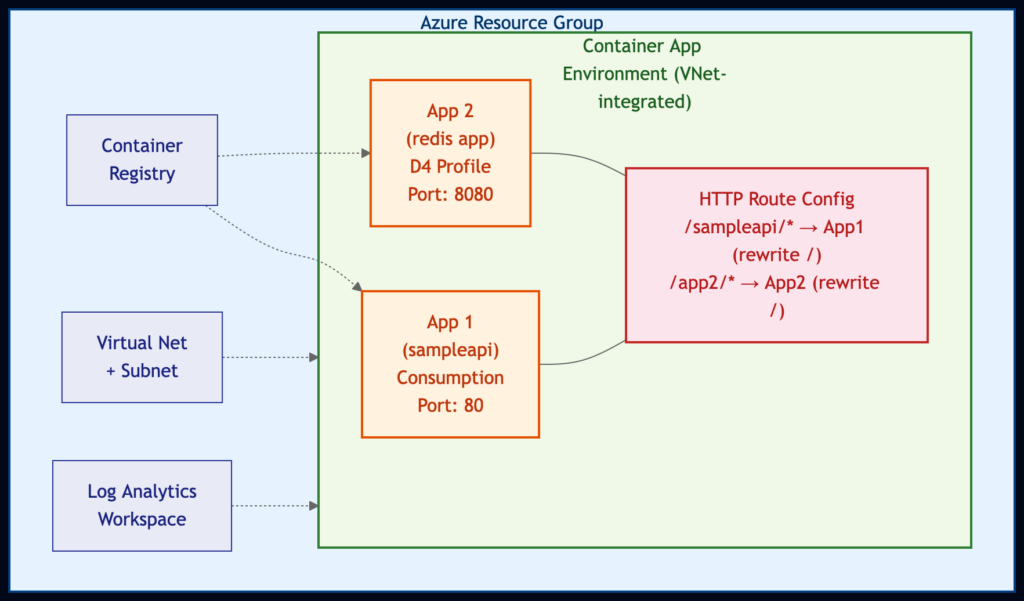
Both apps now run on the Consumption workload profile, keeping the setup lean and serverless. I chose this approach to minimize cost — I only pay for what I use, and both apps can scale down to zero replicas when idle.
Terraform Configuration Walkthrough
I organized the project into clean, reusable modules:
container_apps_path_based_routing/
├── main.tf                          # Root orchestration
├── providers.tf                     # Provider configuration
├── variables.tf                     # Input variables
└── modules/
    ├── container_registry/          # ACR module
    ├── virtual_network/             # VNet + Subnet module
    └── path_based_routing/          # HTTP route config module (AzAPI)
Step 1: Provider Configuration
My configuration requires three providers: azurerm for standard Azure resources, azapi for the path-based routing feature (which uses a preview API), and random for naming.
# Configure the Azure provider
terraform {
  required_providers {
    azurerm = {
      source  = "hashicorp/azurerm"
      version = "~> 4.62.0"
    }

    azapi = {
      source  = "azure/azapi"
      version = "~> 2.8.0"
    }

    random = {
      source  = "hashicorp/random"
      version = "~> 3.4.3"
    }
  }

  required_version = ">= 1.1.0"

  # backend "azurerm" {}
}

provider "azurerm" {
  features {}

  subscription_id = var.subscription-id
  client_id       = var.spn-client-id
  client_secret   = var.spn-client-secret
  tenant_id       = var.spn-tenant-id
}

provider "azapi" {
  subscription_id = var.subscription-id
  client_id       = var.spn-client-id
  client_secret   = var.spn-client-secret
  tenant_id       = var.spn-tenant-id
}
Key takeaway: The azapi provider is essential here. The httpRouteConfigs resource uses the Microsoft.App/managedEnvironments/httpRouteConfigs@2025-10-02-preview API, which is not yet available in the standard azurerm provider. I use the azapi provider because it lets me work with any Azure API — including preview ones — the moment they become available.
Step 2: Foundation Infrastructure
My root main.tf sets up all the foundational resources. Let me break it down piece by piece.
Resource Group and Identity:
locals {
  prefix     = "${random_pet.rg.id}-${var.environment}"
  prefixSafe = "${random_pet.rg.id}${var.environment}"

  image_name             = "containerapps-helloworld:latest"
  redis_sample_app_image = "sample-service-redis:latest"
}

data "azurerm_client_config" "current" {}

resource "random_id" "random" {
  byte_length = 4
}

resource "random_pet" "rg" {
  length = 1
}

resource "azurerm_resource_group" "rg" {
  name     = local.prefix
  location = var.location
}

resource "azurerm_user_assigned_identity" "ca_identity" {
  location            = var.location
  name                = "ca_identity"
  resource_group_name = azurerm_resource_group.rg.name
}

resource "azurerm_role_assignment" "acrpull_mi" {
  scope                = module.container_registry.id
  role_definition_name = "AcrPull"
  principal_id         = azurerm_user_assigned_identity.ca_identity.principal_id
}
I create a User Assigned Managed Identity and grant it AcrPull permissions on the Container Registry. I follow this security best practice — using managed identities instead of admin credentials for image pulls — the same approach I established in Part 1.
Virtual Network and Container Registry Modules:
module "virtual_network" {
  source = "./modules/virtual_network"

  resource_group_name = azurerm_resource_group.rg.name
  location            = var.location

  name                      = "${local.prefix}-vnet"
  address_space             = var.address_space
  subnet_address_prefix_map = var.subnet_address_prefix_map

  prefix = local.prefix
}

module "container_registry" {
  source = "./modules/container_registry"

  resource_group_name = azurerm_resource_group.rg.name
  location            = var.location

  name = "${local.prefixSafe}acr"
}
My Virtual Network module creates a VNet with a subnet that has a delegation for Microsoft.App/environments — this is a requirement for VNet-integrated Container App Environments:
resource "azurerm_virtual_network" "vnet" {
  name                = var.name
  location            = var.location
  resource_group_name = var.resource_group_name
  address_space       = var.address_space
}

resource "azurerm_subnet" "app_subnet" {
  name                 = "${var.prefix}-app-subnet"
  virtual_network_name = azurerm_virtual_network.vnet.name
  resource_group_name  = var.resource_group_name
  address_prefixes     = var.subnet_address_prefix_map["app"]

  delegation {
    name = "delegation"

    service_delegation {
      actions = [
        "Microsoft.Network/virtualNetworks/subnets/join/action",
      ]
      name = "Microsoft.App/environments"
    }
  }
}
Step 3: Container App Environment (Consumption Only)
resource "azurerm_container_app_environment" "app_env" {
  name                       = "${local.prefix}-environment"
  location                   = azurerm_resource_group.rg.location
  resource_group_name        = azurerm_resource_group.rg.name
  log_analytics_workspace_id = azurerm_log_analytics_workspace.log_analytics.id

  infrastructure_subnet_id           = module.virtual_network.app_subnet_id
  infrastructure_resource_group_name = "${azurerm_resource_group.rg.name}-infra"

  workload_profile {
    name                  = "Consumption"
    workload_profile_type = "Consumption"
    maximum_count         = 0
    minimum_count         = 0
  }
}
Step 4: Two Container Apps
I deploy two sample applications — both running on the Consumption profile with their own ingress:
resource "azurerm_container_app" "app1" {
  name                         = "${local.prefix}-app1"
  container_app_environment_id = azurerm_container_app_environment.app_env.id
  resource_group_name          = azurerm_resource_group.rg.name
  revision_mode                = "Single"
  workload_profile_name        = "Consumption"

  identity {
    type         = "SystemAssigned, UserAssigned"
    identity_ids = [azurerm_user_assigned_identity.ca_identity.id]
  }

  registry {
    identity = azurerm_user_assigned_identity.ca_identity.id
    server   = module.container_registry.url
  }

  template {
    container {
      name   = "sampleapi"
      image  = "${module.container_registry.url}/${local.image_name}"
      cpu    = 0.25
      memory = "0.5Gi"
    }
    min_replicas = 0
    max_replicas = 5
  }

  ingress {
    allow_insecure_connections = false
    external_enabled           = true
    target_port                = 80
    traffic_weight {
      percentage      = 100
      latest_revision = true
    }
  }

  depends_on = [null_resource.acr_import]
}

resource "azurerm_container_app" "app2" {
  name                         = "${local.prefix}-app2"
  container_app_environment_id = azurerm_container_app_environment.app_env.id
  resource_group_name          = azurerm_resource_group.rg.name
  revision_mode                = "Single"
  workload_profile_name        = "Consumption"

  identity {
    type         = "SystemAssigned, UserAssigned"
    identity_ids = [azurerm_user_assigned_identity.ca_identity.id]
  }

  registry {
    identity = azurerm_user_assigned_identity.ca_identity.id
    server   = module.container_registry.url
  }

  template {
    container {
      name   = "sampleredisapp"
      image  = "${module.container_registry.url}/${local.redis_sample_app_image}"
      cpu    = 0.25
      memory = "0.5Gi"
    }
    min_replicas = 0
    max_replicas = 5
  }

  ingress {
    allow_insecure_connections = false
    external_enabled           = true
    target_port                = 8080
    traffic_weight {
      percentage      = 100
      latest_revision = true
    }
  }

  depends_on = [null_resource.redis_acr_import]
}
Both apps now run on the Consumption workload profile and pull images from my private Azure Container Registry using the managed identity. I import the images from public Microsoft registries using null_resource with local-exec provisioners — a pragmatic approach that I find works well for demo and bootstrapping scenarios.
Step 5: The Path-Based Routing Module (The Star of the Show)
This is where the real magic happens. My path_based_routing module uses the azapi provider to create an httpRouteConfigs resource:
# Configure the Azure provider
terraform {
  required_providers {
    azapi = {
      source  = "azure/azapi"
   }
  }
}

variable "container_environment_id" {
  description = "The ID of the container environment"
}

variable "routing_name" {
  description = "The name of the HTTP route configuration"
}

variable "rules" {
  description = "The rules for the HTTP route configuration"
  type = list(object(
    {
      description = optional(string)
      routes = optional(list(object({
        action = optional(object({
          prefixRewrite = optional(string)
        }))
        match = optional(object({
          caseSensitive       = optional(bool)
          path                = optional(string)
          pathSeparatedPrefix = optional(string)
          prefix              = optional(string)
        }))
      })))
      targets = optional(list(object({
        containerApp = optional(string)
        label        = optional(string)
        revision     = optional(string)
        weight       = optional(number)
      })))
    }
  ))
}

resource "azapi_resource" "symbolicname" {
  type      = "Microsoft.App/managedEnvironments/httpRouteConfigs@2025-10-02-preview"
  name      = var.routing_name
  parent_id = var.container_environment_id
  body = {
    properties = {
      rules = var.rules
    }
  }
}
Let me highlight what makes this module powerful:
- azapi_resource: I use the Azure REST API directly (Microsoft.App/managedEnvironments/httpRouteConfigs@2025-10-02-preview), so I can leverage this feature even before it lands in the azurerm provider.
- routing_name variable: I added a dedicated variable for the route configuration name. This lets me create multiple named route configurations within the same environment — for example, “default” for production routes and “staging” for preview routes. In the earlier version, this was hardcoded, which limited reusability.
- Flexible rules variable: I designed it to accept a list of routing rules, each with match conditions (path, prefix, case sensitivity), actions (prefix rewriting), and targets (container app name, revision, label, weight).
- Reusable: I made the module generic enough to handle any number of routes and target apps. I simply pass in different rules and a routing_name for each project.
Step 6: Calling the Module with Routing Rules
Back in my root main.tf, I invoke the module with two routing rules:
module "path_based_routing" {
  source = "./modules/path_based_routing"

  routing_name = "default"
  container_environment_id = azurerm_container_app_environment.app_env.id

  rules = [
    {
      description = "Route for sampleapi app"
      routes = [
        {
          match = {
            path = "/sampleapi"
            caseSensitive = false
          }
          action = {
            prefixRewrite = "/"
          }
        }
      ]
      targets = [
        {
          containerApp = azurerm_container_app.app1.name
        }
      ]
    },
    {
      description = "Route for redis sample app"
      routes = [
        {
          match = {
            path = "/app2"
            caseSensitive = false
          }
          action = {
            prefixRewrite = "/"
          }
        }
      ]
      targets = [
        {
          containerApp = azurerm_container_app.app2.name
        }
      ]
    }
  ]
}
I name this route configuration “default” — this is the name that Azure uses to identify the httpRouteConfig resource within my Container App Environment. The path matching uses exact prefix paths (/sampleapi, /app2) rather than wildcard patterns. Azure’s httpRouteConfigs treats these as prefix matches, so /sampleapi will match /sampleapi, /sampleapi/, and /sampleapi/anything.
Here is how it works in practice:
| Incoming Request | Matched Rule | Target App | Rewritten Path |
|---|---|---|---|
| GET /sampleapi/hello | /sampleapi | App1 (sampleapi) | GET /hello |
| GET /sampleapi | /sampleapi | App1 (sampleapi) | GET / |
| GET /app2/data | /app2 | App2 (redis app) | GET /data |
| GET /app2 | /app2 | App2 (redis app) | GET / |
The prefixRewrite = “/” ensures that the routing prefix is stripped before the request reaches the backend container. My apps don’t need to know anything about the routing configuration — they receive requests as if they were served from the root path. I find this particularly valuable because it means I can add path-based routing to existing services without touching a single line of application code.
How to Deploy
Prerequisites
- Azure CLI installed and logged in
- Terraform >= 1.1.0
- An Azure subscription with a Service Principal
Steps
-
Clone the repository:
git clone https://github.com/azure-way/terraform-container-apps.git cd terraform-container-apps/container_apps_path_based_routing -
Create a terraform.tfvars file:
subscription-id = "<your-subscription-id>" spn-client-id = "<your-spn-client-id>" spn-client-secret = "<your-spn-client-secret>" spn-tenant-id = "<your-tenant-id>" -
Initialize and apply:
terraform init terraform plan terraform apply -
Test the routing — After deployment, the output will show the app URLs. I verify that path-based routing is working by sending requests to the environment endpoint with different path prefixes.
Key Takeaways
- Azure Container Apps httpRouteConfigs is a native path-based routing feature that, in my experience, eliminates the need for external gateways like Application Gateway or API Management for common routing scenarios.
- The azapi provider has become my go-to tool for working with preview Azure APIs in Terraform. It lets me adopt new features the moment they become available in the REST API — I don’t have to wait for azurerm to catch up.
- Named route configurations (like “default” in my example) make it possible to manage multiple independent routing policies within a single environment.
- Prefix rewriting keeps my backend apps clean — they don’t need path-awareness or code modifications.
- Consumption-only workload profiles keep costs minimal — both apps scale to zero when idle, and I only pay for what I use.
- Modular Terraform design (as I’ve demonstrated in this repo) makes routing rules reusable, testable, and easy to extend as my microservices architecture grows.
What’s Next
This pattern scales naturally. As I add more microservices to my Container App Environment, I simply add more entries to the rules array. Combined with the weighted targets support, I can implement sophisticated deployment strategies (canary, blue-green) at the individual route level — all managed through Terraform.
The full source code is available in my azure-way/terraform-container-apps repository. Feel free to clone it, adapt it to your needs, and let me know how it works for you.